


Having forms on your website is good. Knowing who submitted them is also good. But the big question is: what did that person do before reaching the form? What pages did they view? What content helped them decide? That's where WPForms User Journey makes a huge difference.
In our experience, WPForms User Journey is a WPForms Pro plugin that tracks and visualizes a user's complete journey on the site before they complete and submit a form. It doesn't just show "someone submitted this," but also reveals which pages they visited, how long they spent on each, and the exact path they followed. With this information, we can better understand user behavior and optimize the website to improve conversions.
If you already use WPForms Pro to capture leads, inquiries, or sales, adding WPForms User Journey is like turning on the light in a room that was half dark.
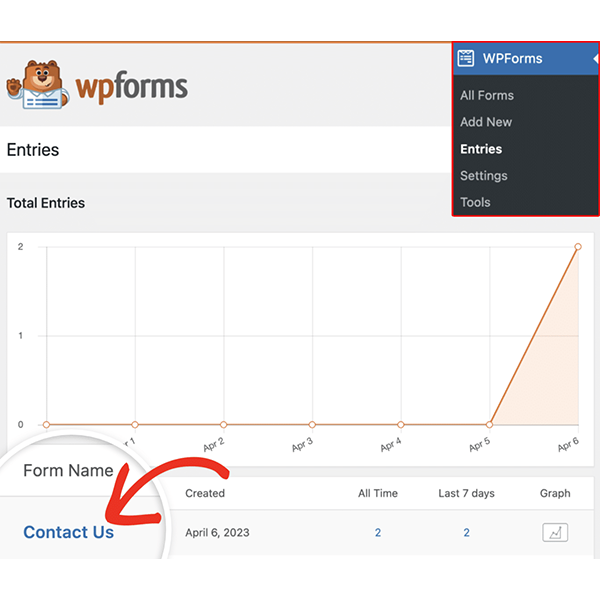
What is WPForms User Journey and how does it fit with WPForms Pro?
An add-on that turns every shipment into a complete story
WPForms User Journey is an official add-on for WPForms Pro. This means it's not a separate system, but rather a component that integrates directly with existing forms. Each time someone fills out and submits a form, WPForms User Journey records their journey through the website and displays it visually.
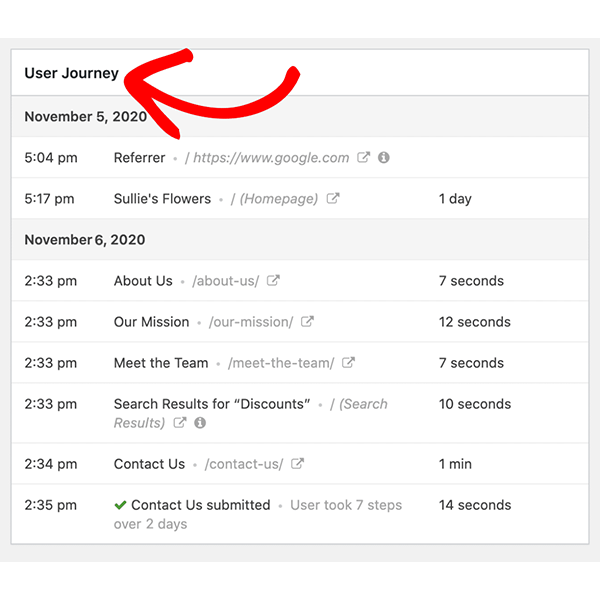
Instead of just seeing the form fields, we also see a summary of the path that led to that submission: pages visited, the order in which they were viewed, the estimated time spent on each page, and when they moved from one page to another. It's literally a "user journey" associated with each entry.
The best part is that all of this is accessible within the same WPForms Pro interface. We don't need to use other tools or manually gather data: WPForms User Journey integrates seamlessly into the workflow we already know.
From “just another shipment” to the full context of the conversion
Without WPForms User Journey, each submission is an isolated piece of data. We know someone filled out the form, but we don't know if they arrived from a campaign, a blog post, the homepage, or after browsing the website in countless ways.
With WPForms User Journey, that submission becomes a complete context. We see, for example:
That the user arrived from a specific landing page
That he had previously checked the price page
That returned to the page of a service
He finally went to the contact form and submitted it.
This information completely changes how we interpret conversions. It ceases to be a cold number and becomes a concrete story that we can analyze and improve.
Benefits of using WPForms User Journey on your website
Understanding what content truly drives conversions
One of the great benefits of WPForms User Journey is the ability to identify which pages typically appear in the path of users who convert. It's not the same for someone to arrive directly at the form as it is to see a pattern where:
They read a specific article
Then they visit a service page
And only then do they fill out the form
In our experience, this insight helps uncover content that we might not have been so aware of, but which is actually driving conversions. With WPForms User Journey, we can strengthen those pages, improve their linking, or replicate their approach in other parts of the site.
Detect friction points and areas where users are lost
WPForms User Journey also shows journeys that aren't so pretty: users who come in, visit many pages and only then make a decision; or journeys where someone seems to "hesitate" a lot before submitting the form.
When looking at several journeys using WPForms User Journey, we began to detect:
Pages that almost never appear before a conversion
Sections where users spend a lot of time but then don't convert
Certain paths that seem too long or complicated
With this information we can simplify routes, improve messages, move forms to more strategic locations, or reduce unnecessary steps.
Make marketing decisions based on actual journeys
Another key benefit of WPForms User Journey is that it provides highly practical data for marketing. Instead of assuming "this campaign is working" or "this content helps sell," we can cross-reference campaign information with the journeys of those who actually submitted forms.
With WPForms, the User Journey is easier:
See if the leads coming from a certain channel follow shorter or longer paths
Knowing if a landing page actually leads to the right content
Detect if a change in copy on a page altered the pre-submission behavior
In our experience, this makes marketing and optimization decisions less intuitive and more based on what users actually do.
Optimize forms and key pages to increase conversions
Finally, WPForms User Journey helps you see the form's context: At what point in the journey does it appear? Does it come too early? Too late? Does what we're asking for make sense based on what the person has already seen?
By analyzing this data, we can:
Adjust the form's location within the page
Change the form type according to the stage of the journey (for example, fewer fields in first interactions)
Create different forms for users arriving from different entries or sections
WPForms User Journey gives us the complete perspective so that the form is not an isolated element, but a logical part of the user's journey.
Key features of WPForms User Journey
Automatic recording of visited pages before submission
The core of WPForms User Journey is the automatic tracking of pages. The add-on tracks which URLs the user visits within the site before submitting a form and saves them in chronological order.
Each form entry displays:
The list of pages the user visited
The order in which he visited them
The title of each page
The specific URL
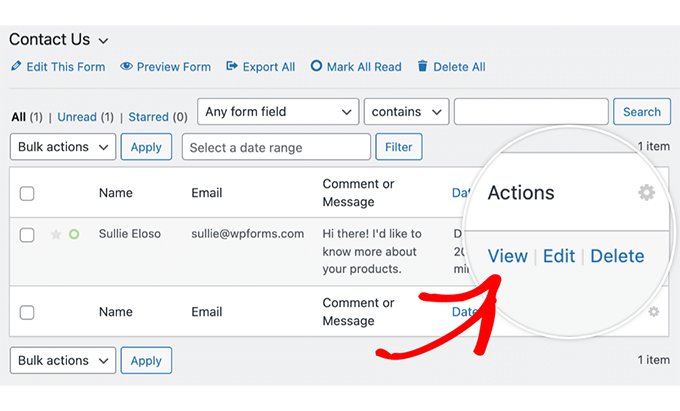
All of this is presented in an easy-to-read format directly within the WPForms Pro form entry, thanks to WPForms User Journey. There's no need to create reports or export data: the journey is right there, embedded within the form data.
Timeline-type visualization of the user journey
It's not just a list of URLs. WPForms User Journey organizes them as a timeline, a kind of timeline of the user's journey. We can see at a glance:
The first page he visited
The intermediate steps
The last page before the form
In our experience, this visual approach is one of the greatest strengths of WPForms User Journey. At a glance, we understand the story without needing to interpret raw data or complex analytics reports.
Weather information on each page
WPForms User Journey also records the approximate time the user spent on each page. This allows you to distinguish between:
Pages that only “touch on in passing”
Pages where people actually stop to read or review content
Knowing how much time users spend at each step of the journey helps identify which sections are providing real value. When we see a page appear frequently in successful journeys and also retains reading time, it's a good candidate for further development and enhancement.
Route saved in each individual shipment
Unlike more general tools, WPForms User Journey saves the paths associated with each individual submission, not just at an aggregate level. When viewing a specific form entry, we see:
The form data
And right below, that person's User Journey
This is useful not only for marketing, but also for sales and support. We can see what someone viewed before requesting a quote, or what they read before submitting a complaint or technical inquiry. All thanks to WPForms User Journey, without leaving the environment where we review the forms.
How to work with WPForms User Journey step by step
Activate the add-on and make sure the forms are using it.
The first step is to activate WPForms User Journey as an add-on within WPForms Pro. Once activated, the plugin begins tracking the journey of users who interact with forms, without requiring complicated configurations.
In our experience, it is advisable to:
Activate WPForms User Journey for the forms that really matter (contact, quote, lead magnets, etc.)
Conduct internal tests, browsing the web and submitting a form to see how the journey is recorded
Confirm that the timeline displays correctly in the backend and that the data is consistent.
From then on, each new relevant shipment will be accompanied by its User Journey.
Analyze the journey of the highest quality leads
Not all leads are created equal. With WPForms User Journey, we can focus on the entries we consider most valuable (for example, inquiries that resulted in a sale) and closely examine their journey.
One approach that works very well is:
Filter or identify high-quality entries.
Review the User Journey of each one.
Note recurring patterns (e.g., certain pages that everyone viewed).
This allows us to see the actual path followed by our most valuable users and adapt the website to facilitate that same journey for more people.
Detect common patterns and bottlenecks
After reviewing several journeys in WPForms User Journey, patterns begin to emerge:
Pages they almost always see before converting
Pages that they often visit just before leaving
Places where time drags on for too long without making any progress.
With this information we can:
Improve the content of key pages in a positive way (those that always appear before a conversion)
Review and simplify pages that seem to slow down the journey
Change internal links to better guide users to the appropriate form.
WPForms User Journey thus becomes a compass to understand where the user experience flows and where it gets stuck.
Real-world use cases of WPForms User Journey
Contact forms on corporate and B2B websites
On corporate and B2B websites, the contact form is often the gateway to new business opportunities. WPForms User Journey helps you see what the user did before requesting information:
Did you see the "About Us" page?
Did you go through success stories or testimonials?
Did you read a technical blog post before making your decision?
With this WPForms User Journey data, we can strengthen the sections that most influence someone's decision to fill out the form, and reorder content to make that journey more natural.
Budget forms and services
In services where the "Request a Quote" form is key, the preceding user journey is even more important. WPForms User Journey allows you to see, for example:
If you check the detailed services page
If you compare several options within the same website
If they go through the pricing section or the FAQ page before submitting the form
With this information, it's easier to adjust the offer, the messages, and the location of the call-to-action buttons so that the user reaches the form at the right time.
Lead generation for courses, memberships, and digital products
In projects involving online courses, memberships, or digital products, WPForms User Journey helps you understand what content truly resonates with your audience and encourages them to share their information.
Which sales pages do you visit before signing up?
If you read testimonials, instructor resumes, or free content
What combination of resources should you download before making the decision?
In our experience, this allows us to adapt the funnel: reinforce the content that appears repeatedly before conversion and create new journeys inspired by those real paths recorded by WPForms User Journey.
Customer support and service forms
It's not all about sales. With WPForms User Journey, we can also improve support. When someone submits a help form, seeing which pages they visited beforehand (documentation, FAQs, articles) helps us:
Understand what you tried to do before requesting support
Detecting gaps in the documentation
Improve the texts or examples where users get lost
WPForms User Journey gives the support team a snapshot of the previous user journey, allowing for a faster and more accurate response.
Best practices when using WPForms User Journey
Don't get lost in the data: focus on what matters
WPForms User Journey can generate a lot of information, especially on high-traffic sites. To make it useful, it's best to focus on:
Key forms: the ones that really drive the business.
Quality leads: those that end in a sale, subscription, or valuable action.
Repeated patterns: what is repeated matters more than a rare isolated journey.
If we look at WPForms User Journey critically, it becomes a very clear tool for improvement, not a sea of data.
Combine WPForms User Journey with other metrics
WPForms User Journey doesn't replace other metrics, but it complements them very well. We can use it alongside:
Campaign data (to see what paths those users follow).
Form conversion metrics (to understand the previous context).
A/B testing (to see if the journey changes when we move elements).
By cross-referencing WPForms User Journey data with other indicators, decisions become more robust.
Review journeys with reasonable frequency
You don't need to look at WPForms User Journey every day, but you should do so regularly, for example:
After launching a new landing page.
After changing an important form.
By introducing a new key section on the website.
At those times, reviewing the journeys that end in shipping helps to verify if the change had the effect we wanted.
Why choose WPForms User Journey over other ways to analyze the user journey
We could try to reconstruct journeys using only analytics tools, but WPForms User Journey has several clear advantages:
The journey is directly associated with each shipment, not with an anonymous user.
The visualization is simple and focused on the history prior to the form.
Everything is visible within WPForms Pro, without having to jump between tools.
In our experience, that proximity to the form is what makes WPForms User Journey special: it's not about analyzing all the traffic, but about focusing on what happens right before the conversion.
If forms are at the heart of lead generation on our site, WPForms User Journey is the most direct way to understand what's really behind each submission.
Conclusion
WPForms User Journey is a WPForms Pro plugin that transforms how we view forms on our website. Instead of simply showing who submitted what, it tracks and visualizes the user's complete journey before submitting the form: pages visited, order, time spent, and path taken.
With this information in hand, we can better understand actual user behavior, identify which content drives conversions, pinpoint points of friction in the user journey, and optimize both forms and key pages. WPForms User Journey transforms every submission into a valuable story for marketing, sales, and support.
If we want to stop guessing how leads arrive at our forms and start seeing it clearly, WPForms User Journey is the missing piece within the WPForms Pro ecosystem.

Reviewed by the WPClub team
At WPClub, we carefully review each product before listing it. Our team evaluates its key features, compatibility, and performance to provide you with reliable, up-to-date, and helpful information when choosing and using each resource available in our store.






















