

WPForms Zapier Addon is the direct bridge between your form submissions and thousands of applications. In practice, it turns every submission into a useful action: creating a lead in your CRM, opening a task in your project manager, sending an SMS, or notifying your team in real time. We chose WPForms Zapier Addon because it reduces clicks, manual errors, and downtime; in other words, it transforms forms into workflows that run automatically the first time.
When we first connected WPForms Zapier, we saw a clear pattern: teams stopped simply copying and pasting and started reviewing results. In our case, every contact form submission instantly feeds Salesforce and HubSpot; moreover, WPForms Zapier formats the fields exactly as the CRM expects, minimizing bounces and doubling the value of each lead.
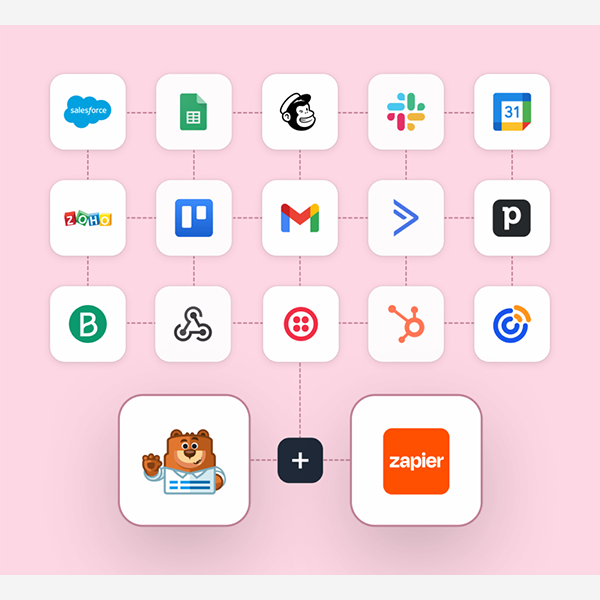
The versatility is real. With the WPForms Zapier Addon, we send rich notifications to Slack with critical data, trigger SMS reminders using Twilio, and, if the event is a course registration, the WPForms Zapier Addon automatically creates the follow-up task in Trello or Asana with a due date. For sales, marketing, support, and finance teams, this translates into fewer steps and more focus on what matters: closing sales and providing better service.
Requirements and setup in minutes (no code)
Implementing the WPForms Zapier Addon is a straightforward process. We followed this sequence and it works perfectly:
-
Activate WPForms Zapier Addon from your WordPress installation.
-
Create (or identify) a form with at least one test submission.
-
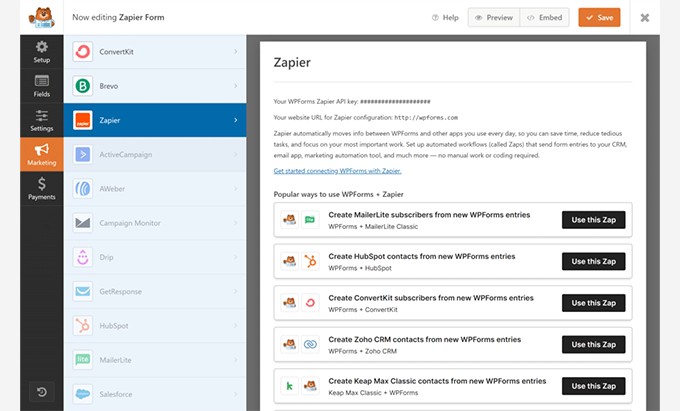
In Zapier, choose “WPForms” as the trigger and link your site with a secure connection.
-
Test the trigger with a real input; validate that the correct fields are being received.
-
Define the action: CRM, Slack, Trello/Asana, Twilio, QuickBooks, FreshBooks, Google Contacts…
-
Map fields accurately and save the Zap.
-
Conduct a comprehensive test and publish it.
When we tested the WPForms Zapier Addon on projects with limited time, the key was to prepare clean forms: clear field names, standardized options, and consistent labels. This way, the WPForms Zapier Addon "understands" the data the first time. And a tip that saves us hours: create a "lab" form to test Zaps without affecting your production forms.
Ready-made recipes: from lead to customer in your CRM effortlessly
With WPForms Zapier Addon, each submission can generate a new lead or contact. Our favorite recipes:
-
Salesforce (Instant Lead): We map name, email, phone number, campaign source, and message. In our experience, with the WPForms Zapier Addon, we assign owners based on country and reduce response times.
-
HubSpot (Contact + Company): We duplicated the action: contact and company in the same Zap. With WPForms Zapier Addon, we applied lifecycle stage properties and tags for nurturing segmentation.
-
Google Contacts (Unified Address Book): When the form is for events or support, WPForms Zapier Addon creates the contact and adds notes with the entry ID for traceability.
-
Automatic rating: We combine WPForms Zapier Addon with an intermediate stage (filters/formatters) and assign priority if the budget or company meets certain criteria.
When we connected the WPForms Zapier Addon for B2B sales, we went from delayed responses to "leads handled in minutes." The difference in conversion is noticeable.
CRM best practices
-
Map required CRM fields and use default values when information is missing.
-
Avoid duplicates with prior searches (find or create) within the Zap.
-
Add the WPForms submission URL for team auditing and context.
Smart operation: automatic notifications, tasks, and reminders
Team coordination is where WPForms Zapier Addon shines on a daily basis:
-
Slack: Each email send triggers a message with the prospect's name, the service they're interested in, and their priority level. We add buttons with links to their CRM profile and the email response.
-
Trello/Asana: The WPForms Zapier Addon creates cards/tasks with a predefined checklist (“contact”, “schedule demo”, “send proposal”) and a deadline + responsible party. In our case, this prevents leads from “falling” out of the funnel.
-
Twilio (SMS): After registering for a webinar, the WPForms Zapier Addon sends a confirmation SMS and a reminder the day before. When we activated this feature, actual attendance increased without adding any burden to the team.
In addition, Zaps adapt using conditional paths: if the user selects "Demo", WPForms Zapier creates a high-priority task; if they choose "Support", it opens a ticket and notifies the correct channel.
Team template ready to copy
-
Slack channel for each key offer.
-
Trello board by funnel stage.
-
Priority fields in the form for routing with WPForms Zapier Addon.
Finances on autopilot: invoices and customers from every shipment
The back office is often the bottleneck. With the WPForms Zapier Addon, we free up hours:
-
QuickBooks: We create the client with name, email, phone number and company; optionally, we open the quote.
-
FreshBooks: Based on the order form, WPForms Zapier Addon generates the invoice with the correct service line and currency.
In our case, we automated pre-billing: service request forms automatically populate QuickBooks and FreshBooks. With WPForms Zapier, the finance team receives clean records, ready for review and submission.
Frictionless Accounting
-
Standardize taxes and currency formats on the form.
-
Use “find or create” to avoid duplicate customers.
-
Attach notes with the shipment ID to track changes.
Clean data: field mapping, validations, and deduplication
Data quality defines the effectiveness of any automation. Here's how we get the most out of the WPForms Zapier Addon:
-
Formatters: We standardized phone numbers (E.164), capitalized names, and validated emails.
-
Filters: We only process “valid” submissions (consent, minimum budget, target country).
-
Previous searches: With “find or create”, WPForms Zapier Addon avoids duplicates in CRM, accounting or contacts.
When we adjusted these steps, support decreased dramatically: fewer errors, less manual intervention. And if a field arrives empty, the WPForms Zapier Addon applies default values to avoid disrupting the flow.
Quality checklist
-
Mandatory fields and clear placeholders.
-
Drop-down lists with closed options.
-
Format validations before sending to Zapier.
Security and reliability: SSL, trigger testing, and retries
Automation must be reliable. With WPForms Zapier Addon, we follow this protocol:
-
SSL/HTTPS active on the site to protect the connection.
-
Trigger test with real data (not lorem) to anticipate borderline cases.
-
Retries and logsIf an external app fails, Zap retries help prevent lost submissions; we save key logs for auditing.
-
Roles and permissionsWe limit who can edit Zaps or critical forms.
Thanks to this approach, WPForms Zapier Addon maintains stability even during traffic peaks and intense campaigns.
Quick comparison: Zapier Addon vs Webhooks Addon
-
WPForms Zapier Addon: Ideal if you want to connect to thousands of apps without code, using ready-made templates and paths. Perfect for non-technical teams that need speed, visibility, and immediate scalability.
-
Webhooks Addon: Preferred when you need direct connections, lower latency, or custom integrations with your own endpoints. Requires more technical support and maintenance.
In many projects we start with WPForms Zapier for speed and coverage; if later the volume or architecture requires it, we migrate critical flows to specific webhooks and maintain WPForms Zapier Addon for everything else.
Conclusion
WPForms Zapier transforms your forms into end-to-end automated processes. We've implemented it for sales, marketing, support, and finance with immediate results: leads in the CRM, helpful notifications, completed tasks, and accounting documents generated automatically. If you're looking for a solution that scales quickly, reduces errors, and frees up your team for higher-value tasks, WPForms Zapier is the direct path to a more agile operation.

Reviewed by the WPClub team
At WPClub, we carefully review each product before listing it. Our team evaluates its key features, compatibility, and performance to provide you with reliable, up-to-date, and helpful information when choosing and using each resource available in our store.






















