Quick summary
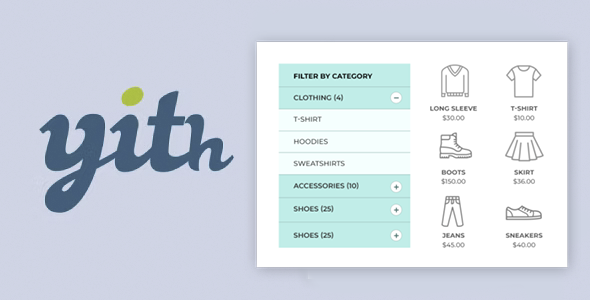
YITH WooCommerce Category Accordion organizes your store's category and subcategory list into clear, compact dropdown menus. It's especially useful for stores with many products, complex product families, or constantly growing catalogs. If your customers get lost navigating the sidebar or store menu, this extension transforms the chaos of categories into an intuitive, easy-to-navigate, and sales-oriented structure.
What problem does it help solve?
In WooCommerce stores with few categories, the standard listing works without much trouble. The problem arises when you start adding categories, subcategories, and deeper levels: the sidebar becomes endless, the menu takes up half the scroll, and the user doesn't know where to begin. If you've ever had a customer contact you because they "can't find" a product that is listed, the cause is usually unclear category navigation.
When working with WooCommerce on real-world projects, it's common to see the category list fully expanded: everything visible, with no visual hierarchy, repeated names, and subcategories that are difficult to distinguish. This not only creates visual clutter but also distracts from the purchase process. Visitors leave before filtering or entering the correct category, which reduces product views, time spent on site, and conversions.
YITH WooCommerce Category Accordion addresses precisely that issue: how to display categories and subcategories in an organized, collapsible, and understandable way within a limited space. Instead of forcing the customer to scroll endlessly, it allows them to expand only what interests them and navigate step by step through your catalog's structure.
Why this solution makes a difference
When categories are grouped in an accordion style, the user first sees the main categories and then expands only what they need. This reduces visual clutter and helps users understand how the store is organized. Each click on a category is intentional, which improves the quality of navigation and, consequently, the likelihood of finding relevant products.
In day-to-day operations, this translates to fewer "I can't find product X" questions, less time spent explaining how to navigate, and more focus on improving the catalog. Furthermore, a well-structured category accordion allows you to quickly identify gaps: poorly named product families, empty sections, or unnecessary subcategories. You gain a much clearer understanding of how the customer perceives your catalog.
When you start noticing that the sidebar of your store looks disproportionate on mobile, with its endless list of categories, an accordion provides immediate clarity. It allows you to condense information without losing depth, something the standard WooCommerce widget doesn't achieve with the same effectiveness or visual focus.
Signs you need this product
- Your category menu or sidebar takes up a large part of the page and forces the user to scroll too much.
- Customers or members of your team comment that certain product families are "difficult to find" in the store.
- You find yourself manually reorganizing the category list to make it look less chaotic, but it still looks disorganized.
- You're expanding your catalog, adding subcategories by brand, size, model, or collection, and the list starts to overflow.
- On mobile, the categories block becomes unusable, with long titles and sub-levels stuck together without visual separation.
- This appears when your ecommerce site is no longer small and you need to show catalog depth without losing clarity.
When does it make sense to use it (and when doesn't)
YITH WooCommerce Category Accordion provides real value when your store has multiple navigation layers: main categories, subcategories, and even extra levels. In this context, having an accordion that groups and hides what's unnecessary at any given time allows the customer to see only what's relevant. It's especially useful for niche projects with many variations, B2B stores with highly technical product lines, or businesses with complex seasonal collections.
On the other hand, if your e-commerce site only handles a few basic categories without subcategories, or you use a very minimalist catalog page with advanced filters as its main focus, you probably don't need it. In these cases, the standard category list already fulfills its function without additional complications, and adding an accordion wouldn't represent a proportional improvement to the initial setup effort.
Who it fits best for
- WooCommerce store owners with medium or large catalogs who want to improve navigation by product families without redesigning the entire site.
- Agencies and freelancers who manage multiple stores and need a clear way to present complex category structures to non-technical clients.
- B2B or industrial projects with long hierarchies: product lines, models, spare parts, components and accessories organized by levels.
- Fashion, sports, decoration or electronics stores where collections, brands, sizes, product types and ranges coexist, and organization becomes critical.
- Marketing managers who want to increase navigation depth (more clicks on relevant categories and subcategories) without sacrificing mobile usability.
Practical benefits
- Real operational improvement: You reduce the time spent "styling" the standard categories widget, as the collapsible presentation solves the problem of excessive information on screen at its root.
- User experience: The customer understands at a glance how your catalog is organized and moves forward by opening and closing sections, instead of getting lost in a long list with no apparent hierarchy.
- Control and organization: The accordion forces you to think about the structure of categories logically, which helps to detect inconsistencies, duplications, or misplaced families.
- Time saving: By having clear navigation, queries related to "I can't find X" decrease, and you can dedicate that time to optimizing listings or sales strategies.
- Error reduction: A visible and organized hierarchy makes it easier for the user to enter the appropriate category, reducing shopping carts with the wrong products and returns due to confusion about the model or variant.
How it fits within WordPress
Within the WordPress ecosystem, YITH WooCommerce Category Accordion acts as a dedicated component for navigating catalog categories, not the entire site. Its role is clearly focused on the shop area: sidebars, specialized menus, or sections where you want to display the WooCommerce category tree in a compact way.
It doesn't replace your theme, nor is it intended to replace the site's main menu. It works with the existing category logic in WooCommerce and presents it in a collapsible format. This allows it to be combined with any design approach you already use: visual page builders, custom layouts, or commercial templates. In this context, it becomes the "catalog navigation module," while other elements handle the overall design and advanced filters.
Typical use cases
- A car parts store with hundreds of references where the user needs to choose first the type of vehicle, then the brand, then the model and finally the specific part, unfolding each level step by step.
- A fashion ecommerce site that organizes the catalog by men, women, children, and within each category by type of garment, season, and collection, keeping the sidebar clean and without an endless list.
- A B2B project that sells machinery and spare parts, with complex families and several layers of technical subcategories, where the accordion allows the professional customer to quickly reach the exact section that interests them.
Frequently Asked Questions about YITH WooCommerce Category Accordion
How does this differ from simply displaying the standard WooCommerce categories widget?
The standard WooCommerce widget displays categories with limited presentation options and, in complex catalogs, ends up taking up too much space. YITH WooCommerce Category Accordion is specifically designed to group levels in a collapsible system, where parent categories can be expanded and collapsed. This creates a more guided and compact navigation, especially useful when your catalog structure has several levels of depth and you want to avoid endless listings in the sidebar.
What happens if I have many subcategories within the same product family?
When you manage many subcategories under a single main category, the typical list becomes long and difficult to scan. With YITH WooCommerce Category Accordion, these subcategories remain hidden until the user opens the parent category. This way, each category is presented as an independent block, easy to explore. This helps prevent the customer from being overwhelmed by all the options at once, allowing them to navigate the tree only to the parts that interest them.
Is it useful if my audience mostly accesses it from mobile devices?
On mobile devices, screen space is very limited, and a traditional category list can take up several scrolls, reducing the visibility of products and filters. YITH WooCommerce Category Accordion helps compress the category structure into collapsible blocks, so users see the essentials first and can decide what to open. This improves usability on phones and tablets, reduces the feeling of clutter, and makes browsing the catalog faster and clearer for mobile shoppers.
What happens if I reorganize or add new categories in WooCommerce?
When you expand your catalog or change the category hierarchy within WooCommerce, YITH WooCommerce Category Accordion follows that same structure. By modifying the organization from the product panel, the accordion reflects these changes in the navigation. This allows you to evolve the category tree as your store grows without having to completely redesign how it's displayed, always maintaining a clean and collapsible presentation for the end user.
Does it still make sense to use it if I also use advanced filters by attributes or tags?
Filters by attributes, tags, or features help refine searches within a category, but they don't replace the need for a clear product family hierarchy. YITH WooCommerce Category Accordion operates on a different level: it guides the user to the appropriate category before applying more specific filters. This combination is especially useful in large catalogs: you first choose the correct family using the accordion and then use filters to refine the results by size, color, brand, or other variables.
Conclusion
YITH WooCommerce Category Accordion exists to solve a specific problem: the visual and functional disorganization of categories in stores with large catalogs or complex hierarchies. If you've ever experienced your sidebar looking like a wall of text with no clear order, this extension organizes navigation by categories and subcategories in a collapsible format.
By integrating a specific accordion for categories within your WordPress workflow, you achieve a more guided shopping experience, less support dedicated to explaining "where everything is," and a more coherent catalog structure for the future growth of your ecommerce business.