
Unicamp University and College WordPress Theme 2.7.7


- Secure Payment
- Support from Monday to Friday
- With you since 2018
$69.00 El precio original era: $69.00.$6.99El precio actual es: $6.99.
Quick summary
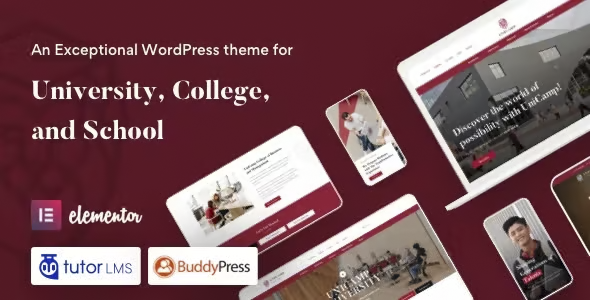
Unicamp is a WordPress theme designed specifically for universities, colleges, academies, and course platforms. It allows you to create clear, navigable, and visually consistent academic portals without relying on generic designs. It solves the common problem of displaying programs, faculty, events, and admissions information in a scattered way. It's ideal for communications teams, educational marketing managers, and developers who need a well-organized, scalable institutional website focused on attracting and guiding prospective students.
What problem does it help solve?
In many educational institutions, the website ends up being a collage of disparate pages: one template for "About Us," another for "Programs," embedded PDFs for the curriculum, and a separate calendar for events. When you start noticing students emailing questions that are already "on the website," the problem isn't the information itself, but how it's presented. The structure is confusing, the navigation is unguid, and each section seems to belong to a different project.
Unicamp addresses precisely this scenario. It provides a visual architecture designed for academic contexts: pages for study programs, faculty profiles, course listings, admissions announcements, and areas for events and news that connect logically. If you've ever found that publishing a new course offering involves improvising layouts or commissioning designs from scratch, this theme helps avoid that constant frustration and reduces reliance on makeshift solutions.
Why this solution makes a difference
In real-world educational projects, time isn't just spent uploading content, but also reorganizing it every time the institution changes its offerings or internal structure. Unicamp is designed so that the usual changes in the academic world—new programs, curriculum updates, faculty changes, and the opening of new campuses or locations—can be integrated into a predefined and coherent visual framework. This reduces layout errors, avoids duplicate information, and makes it easier for different team members to collaborate without disrupting the design.
On the other hand, the navigation focuses on the prospective student's journey: discovering the institution, exploring programs, reviewing requirements, meeting the faculty, checking events or webinars, and culminating in an information request or admissions process. The impact is noticeable in the daily experience: fewer emails saying "I can't find the form," fewer calls with basic questions, and more visits that complete the key steps defining the recruitment and enrollment process.
Signs you need this product
- Problem already present on the site: Users get lost among menus, cannot find specific programs, or important academic content is hidden in PDFs and broken links.
- Friction in WordPress: Every time you want to publish a new course, diploma, or event, you have to "invent" a different design or use builders that give uneven results between sections.
- Loss of control or time: Keeping the careers, news, faculty, and calendar sections up to date requires you to manually review many pages, with a high risk of inconsistencies.
- Typical growth scenario: Your institution is expanding its offerings, adding online or hybrid modalities, and the current theme falls short of organizing an academic portal with multiple levels of information.
When does it make sense to use it (and when doesn't)
Unicamp makes sense when the project's focus is educational: universities, colleges, technical institutes, private academies, or course platforms that want to present themselves as a structured digital campus. If you manage information about programs, admissions, faculty, departments, scholarships, or academic news, an education-oriented design saves many hours of setup and avoids relying on generic themes that don't understand this context.
It also adds value when the communications team needs to maintain the site long-term without resorting to custom development for each new enrollment campaign or program launch. In that context, the theme offers a clear visual foundation on which to build admissions landing pages, filterable course listings, and pages for faculties and departments.
However, this product isn't necessary if your site is a simple corporate website with few sections, no academic structure (for example, a consulting firm with a basic blog), or if you only need a presentation page for a single course with minimal information. For sites with a very limited training offering and no need for complex hierarchies, a simple corporate theme may suffice.
Who it fits best for
- Educational marketing managers: People in charge of recruiting students who need a portal that accompanies each stage of the decision process without navigation barriers or improvised design.
- Institutional communication departments: teams that manage news, press releases, events and admissions sections and require an orderly, predefined and easy-to-maintain environment.
- Developers and agencies: Professionals who create websites for universities, colleges, or academies are looking for a specialized platform that solves the typical structure of a digital campus from the start.
Practical benefits
- Real operational improvement: The academic portal is organized by clear content types (programs, courses, teachers, events), which allows the website to be kept up-to-date without rebuilding designs in each academic year.
- User experience: Prospective students quickly find the key information: what to study, with whom, when it starts, requirements and next steps, without confusing jumps between pages.
- Control and organization: The institution gains a stable visual scheme, where each academic unit knows where and how to present its information, avoiding duplicates and missing sections.
- Time saving: When working with WordPress, much of the work involves reusing structures already designed for education, rather than designing each new course, seminar, or webinar from scratch.
- Error reduction: By using consistent templates, broken links, misaligned content, and pages without calls to action are minimized. This is especially important when a site grows without a common foundation; Unicamp makes that growth more organized.
How it fits within WordPress
Within the WordPress ecosystem, Unicamp acts as the visual and structural layer of the online campus. It defines the layout of key pages (faculty portal, areas of study, faculty profiles, course listings, and admissions sections), while WordPress manages the content and users. In the daily workflow, the responsible staff only need to create new posts or pages following the predefined structures, maintaining consistency without altering the underlying design.
In educational projects with many participants—administration, academic coordination, communications, marketing—this separation is important. Each role focuses on its task: some generate academic content, others publish news or events, and the theme ensures that everything is presented with the same visual consistency. If you've already experienced different editors disrupting the site's aesthetics when updating information, Unicamp helps limit this inconsistency with a clear visual guide.
Typical use cases
- University portal with several faculties: Hierarchical presentation of undergraduate and postgraduate programs, with detailed information sheets, faculty profiles, academic events calendar and direct access to admission processes.
- Case study of a private academy: A training school that offers face-to-face and online courses can display its catalog with filters by category, level or modality, offering homogeneous information for each training program.
- Intensive capture situation: During enrollment campaigns, pages created with Unicamp are used as a destination for announcements and communications, organizing program information, testimonials, informational events, and contact forms in a single journey.
Frequently Asked Questions about Unicamp
How does Unicamp differ from a generic corporate theme?
Unicamp is designed with the needs of an educational institution in mind, not a generic company. The navigation, content blocks, and hierarchy are designed to showcase programs, faculties, professors, events, and admissions processes in a connected way. This avoids the need to adapt corporate themes that fall short of handling multiple programs of study or campuses. The result is a portal that feels naturally academic, not a forced corporate website.
Is it suitable for institutions with many programs and locations?
Yes, it makes sense when the number of programs, modalities, and campuses starts to complicate organization. Unicamp makes it easy to group programs by faculties, levels, or areas of knowledge, maintaining a clear and repeatable structure. This way, a student can navigate to what interests them without getting lost among disparate pages. For institutions with a broad catalog, this organization reduces the risk of certain programs becoming "hidden" or difficult to see.
Can it be used for an online course platform that wants to look like a campus?
Unicamp is a good fit when a training platform wants to convey a campus feel, with identifiable instructors, a calendar of events, news, and admissions or registration sections. It allows courses to be presented as part of a serious educational structure, rather than as context-free listings. This is especially helpful for projects that sell recurring training and seek to differentiate themselves with a strong institutional image, more akin to a university than a product catalog.
What specific benefits does it bring to the institution's communications team?
The communications team gains a streamlined environment where each piece of content has its designated place. News, admissions campaigns, events, and important announcements are integrated into designs intended for easy reading and sharing. Furthermore, by reusing education-specific templates, the team avoids relying on a single designer for every post. This improves efficiency during peak seasons, such as enrollment periods or new program launches, by reducing internal bottlenecks.
Does it make sense to use Unicamp if only one program or master's degree is offered?
In that case, the decision depends on the project's timeframe. If the institution plans to stick with a single program without expanding its offerings, a simpler theme may suffice. However, when there's an intention to grow into several master's programs, short courses, or additional formats, Unicamp allows for establishing a scalable structure from the outset. The greatest advantage becomes apparent when the catalog of training options diversifies over time.
Conclusion
Unicamp exists to solve a very specific problem: transforming disorganized educational websites into clear, coherent academic portals ready to grow. It helps present information about programs, faculty, events, and admissions in a way that is logical for the user and manageable for the internal team. If your institution is already feeling the strain of a makeshift website, this theme offers a specialized foundation on which to build a robust digital campus focused on student recruitment.
Latest update:

Written by: WPClub
With over seven years of experience curating, managing, and distributing GPL products, our content is based on hands-on experience, technical review, testing, and feedback from thousands of users. We aim to democratize and simplify the WordPress world so you can choose with confidence, speed, and ease.
Your Individual Purchase Includes:
- Lifetime updates.*
- Official product, ready to use.
- Immediate access to the product.
- Clean and virus-free files.
- GNU GPL V2/V3 License
- Technical support in Spanish and English.
* In the case of memberships, the period during which you will receive updates will depend on the type of membership purchased: monthly, annual, or lifetime.
Notify Update
We update products Monday through Friday. However, if the product you see is not yet updated, you can notify us so we can prioritize updating it whenever possible.
Get your questions answered here
Here you'll find answers to frequently asked questions about our service: how it works, what it includes, and how to get the most out of it.
On how many websites can I use the products?
You can use any product from our store on any website you want.
Will I get updates?
Absolutely. If you buy an individual product, you'll get lifetime updates for that product.
On the other hand, if you purchase a membership, you will receive updates until your membership expires.
What if I have a problem?
First of all, we want you to know that you can count on us. We will assist you and provide the necessary support, so you can rest assured.
On the other hand, it is important for you to know that, given the time difference between countries, your time and ours may not be the same, so we will be delayed accordingly.
Our opening hours start at 9 AM from Monday to Friday, UTC -3. We are open until around 6 PM.
Do they provide technical support?
Yes, and regarding the time, it is usually on average within 24 to 48 business hours.
However, there are times when we have already provided an answer and solution in less than a day, depending on the case.
Are there download limits?
No. We don't believe in that format, so you can download as many times as you want. No problem. We pay for high-quality professional storage precisely to avoid problems.
Do they provide license keys?
No. Giving out the keys is not a viable option, as we have had experiences where they end up circulating everywhere and we can even lose the associated accounts.
That said, all products are original and, in cases where a license key is required to function, we will take care of pre-activating them for you.
Does my purchase include an invoice?
Yes. After payment, you will be able to access your invoice immediately in the "Purchases" section of your user account.
That is why it is important that you properly complete the information requested at the time of payment.
Is there a warranty?
Yes, of course. If there's a problem we can't resolve, or if there's an external issue that doesn't have a general solution, you'll receive support and, if necessary, a full refund. We have a 14-day refund policy from the date of purchase.
- It should be noted that there is no warranty if the product works well and it simply wasn't what you wanted.
There have been instances where someone buys a product, the product works perfectly, but they don't like it and want a refund, keeping the product. That's not right.
However, everything is evaluable and reasonable. Let's use judgment together.
What are the opening hours?
Our opening hours are:
- Monday to Friday, from 9 a.m. to 6 p.m.
- Saturday and Sunday: No service.
UTC -3 time

Our Reputation on Trustpilot
Many thanks to those who take the time to give us a rating on Trustpilot. Each and every one of your comments is very helpful to us. We strive to provide a rewarding experience for every member of our community, always with respect and care. We'll be here!






















WPClub Memberships
Access our entire catalog for a single payment. We offer three memberships: Monthly, Annual, and Lifetime (One-Time Payment).
- Save thousands of dollars
- Unlimited daily downloads
- No recurring payments
- Fast downloads by AWS
- Quality service and support, validated since 2018
- We work with love for our community