Quick summary
YITH WooCommerce Booking and Appointment is an extension that transforms your WooCommerce store into a complete booking system. It allows you to sell time, services, appointments, and rentals instead of physical products, controlling schedules, availability, and duration directly from your WordPress dashboard. It's especially useful for businesses that operate on an hourly, daily, or time-based basis and require customers to book directly online without emails or phone calls.
What problem does it help solve?
The problem arises when you offer services or rentals, and WooCommerce, on its own, can only sell products in stock, not manage scheduling. If you've ever had two clients book the same time slot via WhatsApp or email, you know that manually managing the calendar leads to errors, overlaps, and wasted time confirming each appointment. Furthermore, the client doesn't have a clear view of available days or times, which creates uncertainty and hinders many booking decisions.
In real-world WordPress projects, this is seen in gyms, photography studios, professional practices, room or equipment rentals, academies, and all kinds of services where the main product is time. Without an integrated booking system, WooCommerce only allows you to "sell" something, but not automatically block a date, set a specific duration, establish available time slots, or manage calendar changes from a single location. And that's where YITH WooCommerce Booking and Appointment comes in.
Why this solution makes a difference
The key difference is that it transforms WooCommerce into a booking calendar running in the background. Instead of manually managing each appointment, the client chooses the date, time, and duration according to the rules you define, and the system adjusts the availability accordingly. When you start noticing your schedule is scattered across calls, paper notes, and emails, centralizing everything within WordPress completely changes your daily organization.
On a daily basis, this has an impact on several fronts: you reduce double booking errors, save administrative time, deliver a clear user experience, and have a unified view of your occupancy from the dashboard. Furthermore, you can better adapt your offerings to real-time demand, expanding or restricting hours without redesigning pages or changing the store's structure. Everything is managed from an environment you already know: WooCommerce.
Signs you need this product
- Problem already present on the site: You receive orders without a specific date and you have to chase the customer to agree on a day and time, which lengthens each sale.
- Friction in WordPress or WooCommerce: You use simple or variable products to "simulate" bookings and are forced to manually edit orders to adjust availability.
- Loss of control or time: You manage your schedule using spreadsheets, external calendars, or notebooks, and you don't fully trust that the website's schedule reflects reality.
- Typical growth scenario: Your project goes from managing a few appointments per month to many bookings per day, and the makeshift system that worked at the beginning starts to break down.
When does it make sense to use it (and when doesn't)
Integrating YITH WooCommerce Booking and Appointment makes sense when your core offering is time-based: consulting sessions, daily rentals, classes, guided tours, table reservations, events with limited seating at specific times, or any service where securing a time slot is as important as collecting payment. In this context, moving from basic forms or emails to a structured booking flow in WooCommerce reduces friction and clarifies what the customer can and cannot book.
On the other hand, it's not necessary for stores focused solely on physical products that are shipped and don't depend on opening hours, nor for projects where the volume of appointments is minimal and easily managed by phone or messaging. If you only offer one occasional service per month and organizing it manually isn't a hassle, adding a complete booking system won't provide clear value. This add-on is designed for when bookings cease to be an exception and become the core of your business.
Who it fits best for
- Hourly service professionals: consultants, coaches, lawyers, psychologists, advisors, or any profile that sells time in scheduled sessions.
- Rental businesses: car rental companies, sports equipment, offices, meeting rooms, small accommodations or event spaces.
- Training centers and activities: academies, schools, workshops, private lessons, sports or cultural activities with places calculated by schedule and day.
- WordPress project managers: Agencies and developers who need to offer their clients a structured booking system, manageable from WooCommerce without resorting to external platforms.
Practical benefits
- Real operational improvement: You configure the duration of each service, available intervals, non-working days, and booking limitations, and let WooCommerce apply these rules to each order without you having to manually review everything.
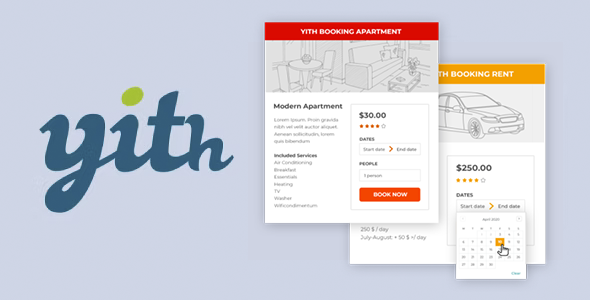
- Clear user experience: The customer sees a calendar, selects available dates and times in real time, and understands from the first moment what they can book, for how long, and under what conditions.
- Control and organization: Reservations are stored as WooCommerce orders, allowing you to review, filter, and manage them within the same dashboard where you already work on your sales and products.
- Time saving: You'll reduce phone calls, back-and-forth emails, and subsequent scheduling adjustments. If you've ever spent more time coordinating appointments than actually providing the service, you'll notice the difference.
- Error reduction: By automatically blocking reserved time slots, overlaps and misunderstandings are avoided, which is critical when managing multiple appointments or resources at once.
How it fits within WordPress
YITH WooCommerce Booking and Appointment integrates directly into the existing WooCommerce structure. Instead of creating "regular products," you configure bookable items from the same dashboard, adding rules for scheduling, duration, and availability. In this context, your workflow changes little: you still create products, adjust prices, and manage orders; only now, these products represent time slots or resources that are automatically blocked upon booking.
On the other hand, since everything is within WordPress, you can combine bookings with other types of products, use standard store pages to showcase your services, and maintain a single system for payments, taxes, discounts, and automated emails. You don't have to take your customers to external platforms or switch environments to check which days are fully booked or which time slots are available.
Typical use cases
- Booking professional services: An office that offers 60-minute consultations allows the client to choose the exact date and time, and each session is recorded as a WooCommerce order with all the necessary information.
- Rental by days or weeks: A bicycle rental company sets up booking periods by day, defines a maximum number of units per date, and avoids overselling on high-demand dates without manually reviewing each request.
- Management of places in activities: A yoga center creates classes with fixed schedules and limited spaces, allowing students to reserve their place directly from the website without contacting by messaging or phone.
Frequently Asked Questions about YITH WooCommerce Booking and Appointment
What differentiates YITH WooCommerce Booking and Appointment from selling services as regular products?
Selling services as standard products in WooCommerce only allows you to charge a price, but not to control dates, times, or duration in a structured way. YITH WooCommerce Booking and Appointment adds an extra layer of management: define which days are available, which time slots can be booked, how many slots you accept per interval, and how those slots are blocked when an order is confirmed. This way, the "product" ceases to be static and becomes a time or resource that is managed with clear rules.
Can I handle different types of reservations within the same store?
Yes. You can work with services booked by the hour, others rented by the day, and activities with specific dates, all within the same WooCommerce installation. YITH WooCommerce Booking and Appointment lets you configure each bookable item with its own parameters, so individual consultations and multi-day rentals can coexist seamlessly. This is especially useful when your business combines sessions, courses, and rentals, and you need each to adhere to its own time constraints.
What happens to availability when a customer completes a booking?
When a user makes a reservation through a product configured with YITH WooCommerce Booking and Appointment, the system automatically adjusts availability according to your defined rules. If you manage a single resource, the available slot will be blocked for other users. If you work with multiple units or spaces, the counter will decrease until it reaches the set limit. All of this control is managed from within WooCommerce, eliminating the need to manually edit calendars or update product information each time.
Is it suitable for managing bookings for multiple resources at once, such as rooms or professionals?
YITH WooCommerce Booking and Appointment is useful when you need to associate bookings with specific resources: a room, a booth, a professional, or a specific piece of equipment. You can structure your bookable products to reflect how you work in real life—for example, a service offered by different people at different times or a space rented in various formats. This way, you avoid having a single, disorganized calendar and manage the occupancy of each resource in an organized way within the dashboard.
What improvements are made to the customer experience when using YITH WooCommerce Booking and Appointment?
The visitor doesn't have to guess your availability or wait for a response. They see an up-to-date calendar, select specific dates and times, learn the service duration and final price before confirming. The entire process takes place within the online store, following the same checkout flow as for any other WooCommerce product. This reduces friction, increases trust, and shortens the time between initial interest and actual booking—crucial for services where the user decides in a matter of minutes.
Conclusion
YITH WooCommerce Booking and Appointment is designed for time-sensitive businesses that need WooCommerce to manage bookings with the same robustness it uses to sell products. If your daily operations are already affected by overlaps, last-minute corrections, and calendars scattered across multiple platforms, transforming your store into a structured booking system brings order, clarity, and fewer repetitive tasks. When your website evolves from a simple storefront into your primary calendar, this extension makes a significant difference in how you work each day.