Quick summary
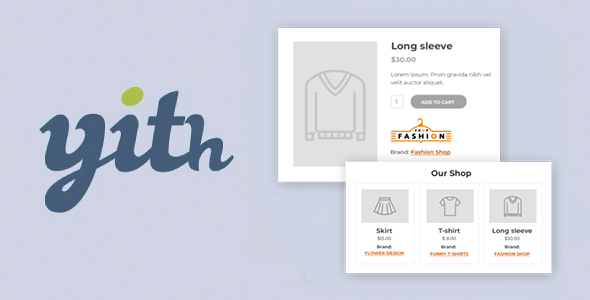
YITH WooCommerce Brands is a dedicated extension for adding, managing, and displaying brands in an online store built with WooCommerce. It solves the problem of catalogs lacking manufacturer identity, clear filters, and visual trust for shoppers. It's designed for stores selling products from various brands that need users to quickly find what they're looking for, improve their perception of quality, and increase the value of each product listing.
What problem does it help solve?
In many WooCommerce stores, all products are displayed only by category, price, or generic attributes. Customers enter, search for a specific brand, but only see endless listings with no clear reference to the manufacturer. When this happens, navigation becomes slow, searches are repeated, and sales are lost due to frustration or mistrust.
In real-world e-commerce projects, brand is often the primary decision-making factor: some users always buy from the same manufacturer, others only trust certain brands, and still others compare different product lines within the same company. Without structured brand management, WooCommerce doesn't offer a native and organized way to display this vast array of manufacturers, nor to create specific lists, brand pages, or dedicated filters.
If you've ever had a customer ask, "Where can I see only products from brand X?" and you have to send them a manual URL or tell them to use the search bar, you're already experiencing this problem. There's a lack of a brand-centric organizational layer that's visible, navigable, and consistent with how users actually shop.
Why this solution makes a difference
YITH WooCommerce Brands introduces a level of organization that WooCommerce alone doesn't offer: it transforms brands into a structural element of the catalog. It doesn't simply add another piece of information to the product; it creates a browsing experience centered around the manufacturer: listings by brand, segmented access, and clear visualization on product pages. This directly impacts how customers explore your store and how quickly they find what they're looking for.
On the other hand, in day-to-day management, having well-defined brands allows you to prepare specific campaigns, highlight collections from a single manufacturer, and maintain visual consistency among related products. When you start to notice your catalog growing, you add new suppliers, and the category menu is no longer sufficient, working with organized brands gives you control and prevents improvisation with loose labels or unclear descriptions.
Furthermore, when working with WordPress, having a dedicated branding system reduces manual errors: you don't need to repeat the manufacturer's name in each product title or in a free text field. The information is grouped, reused, and displayed consistently throughout the store, impacting both the user experience and your ability to keep the catalog clean as it grows.
Signs you need this product
- Customers ask you for links or complain that they can't easily find products from a specific brand.
- Notes friction when trying to organize the catalog using only generic WooCommerce categories, tags, and attributes.
- You notice a loss of time when managing records because you manually repeat manufacturer information and end up with inconsistent data.
- Your store is in a growth phase, you work with several suppliers and you need to showcase the value of each brand within an increasingly extensive catalog.
When does it make sense to use it (and when doesn't)
YITH WooCommerce Brands makes sense when your store works with more than one relevant manufacturer and brand name influences purchasing decisions. If you manage products in fashion, electronics, cosmetics, spare parts, sporting goods, or any sector where customers recognize brands, adding a layer of navigation and visibility by manufacturer improves how users browse the catalog and reinforces the perception of professionalism.
It's also useful when planning marketing campaigns focused on specific brands: brand promotions, collection launches, or featured sections from a supplier. In that context, you need the brand to exist as its own entity, with its own listing and clear identification on each product.
However, this plugin isn't necessary if you sell a single product with no variations, offer only services unrelated to manufacturers, or manage a store with very few items where the brand doesn't influence the customer's decision. If your catalog is minimal and users don't bother to check who manufactures what you sell, brand organization adds little value, and it might be more practical to maintain the basic WooCommerce structure.
Who it fits best for
- Online store owners who market several recognizable brands need customers to be able to browse by manufacturer effortlessly.
- Agencies and consultants that manage ecommerce for third parties and require a scalable catalog structure that is easy to maintain and aligned with each brand's marketing strategy.
- Distribution projects, multi-brand retail or vertical marketplaces where each supplier wants to see their identity well represented within the WooCommerce store.
Practical benefits
- Real operational improvement: You reduce the need to repeat manufacturer information in titles or descriptions, centralize brand management, and keep the catalog more organized.
- User experience: The customer easily recognizes which brand they are viewing, accesses listings filtered by manufacturer, and trusts the store more when they see a clear structure.
- Control and organization: By having brands as your own element, you can structure specific promotions, sections, and links without relying on improvised labels.
- Time saving: By assigning a brand only once and reusing that information, you simplify the creation and updating of products, especially in large catalogs.
- Error reduction: It reduces the possibility of misspelling the manufacturer's name, duplicating similar brands, or mixing names in different parts of the store.
How it fits within WordPress
Within the standard WordPress workflow, YITH WooCommerce Brands acts as an additional structural layer on top of WooCommerce, specifically designed for manufacturers. It doesn't replace categories or tags; it complements them. Instead of forcing the brand into existing fields, it treats it as a distinct element, making it easier to manage in the dashboard and display on the public side of the store.
In your day-to-day work, when you add or edit products, you consider not only the category, price, and inventory, but also the brand they belong to. This categorization results in clearer navigation for the customer and a catalog that remains consistent with the store's business model. As the project grows, having well-defined brands becomes essential for organizing collections and preparing campaigns targeted at specific manufacturers.
Typical use cases
- An online clothing store that works with several brands needs the user to be able to filter by brand to see only their favorite designers and explore collections from each one.
- An electronics ecommerce site that wants to group products from a specific manufacturer on a dedicated page, linked from external campaigns and internal banners.
- A sports accessories project in which different manufacturers share a category (e.g., sneakers or backpacks), but the buyer decides primarily based on the trusted brand.
Frequently Asked Questions about YITH WooCommerce Brands
How does YITH WooCommerce Brands differ from using only categories or tags?
Categories and tags in WooCommerce are designed to group products by type, use, or general characteristics. YITH WooCommerce Brands introduces a dedicated layer for manufacturers, with its own organizational and display logic. This allows you to clearly separate catalog structure (categories) from product identity (brand). By having a dedicated system, you avoid mixing brands with generic tags, reduce clutter, and achieve clearer navigation for those looking for a specific manufacturer.
What happens to my store if I've already been indicating the brand in the product title?
If you've been including the brand name in the title, you've likely ended up with long and unclear product listing names. By incorporating YITH WooCommerce Brands, you can maintain cleaner titles and delegate manufacturer information to the brand system. This improves readability, makes it easier for customers to scan the listing, and gives you the flexibility to refocus titles on what truly differentiates each product without constantly repeating the brand name.
When does working with brands in WooCommerce become truly useful?
This approach becomes truly useful when your catalog expands beyond a few dozen products and you begin working with several key manufacturers. When you start noticing that customers are asking for specific brands, that certain companies account for a significant portion of your sales, or that you want to launch targeted campaigns for each manufacturer, there's a real need to separate and highlight that information. At that point, managing brands with a clear structure makes both your daily operations and sales communication much easier.
Is YITH WooCommerce Brands suitable for B2B projects with multiple suppliers?
In B2B environments, where you work with extensive catalogs and multiple suppliers, brands are key to organizing information. YITH WooCommerce Brands allows you to differentiate what belongs to each manufacturer and display it in a way that's easy for professional buyers to understand. If you've ever had corporate clients request to see only a specific supplier's catalog, having a well-built branding system makes it easier to send direct links, create dedicated sections, and reduce confusion during the purchasing process.
Does it make sense to use YITH WooCommerce Brands if I only sell products under my own brand?
If your entire catalog belongs to a single brand and you don't intend to add others, the value of a brand-specific system is limited. In that case, your business identity is best reinforced through site design, visual presentation, and product information, without the need for an additional layer of manufacturer-based categorization. YITH WooCommerce Brands is most beneficial when there are multiple manufacturers and branding is a key decision-making factor for customers within the same store.
Conclusion
YITH WooCommerce Brands is designed for stores where branding is a key factor in purchasing decisions and where the catalog no longer relies solely on generic categories and tags. By giving manufacturers their own dedicated space within WooCommerce, it improves navigation, strengthens user trust, and simplifies daily product management. If your e-commerce site carries multiple brands and you want to leverage that variety, organizing your catalog around them becomes a logical and practical step.