
YITH WooCommerce Stripe Connect 3.11.0


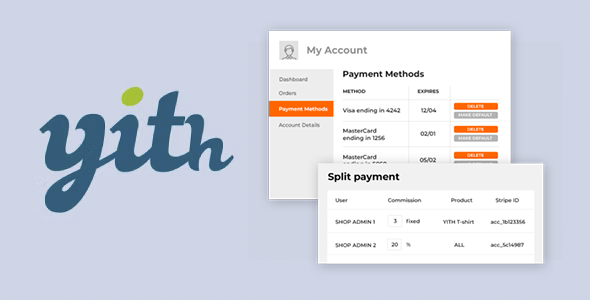
- Secure Payment
- Support from Monday to Friday
- With you since 2018
Exclusive Product for Members of Our Lifetime Membership
Quick summary
YITH WooCommerce Stripe Connect is designed for stores that manage payments distributed among multiple sellers or business partners within the same WooCommerce store. It simplifies payments with Stripe and automatically distributes amounts across different accounts, eliminating manual calculations and payment errors. It's especially useful if you manage a marketplace, sell in collaboration with third parties, or share revenue with suppliers from your WordPress site.
What problem does it help solve?
When WooCommerce grows from a simple online store to a project with multiple vendors, partners, or suppliers, the biggest hurdle becomes money management: who gets paid what, how much each person is entitled to, and how to distribute it without making mistakes. If you've ever ended up with a spreadsheet full of orders, commissions, and percentages, you know how easy it is to make a mistake and how complicated it is to explain an incorrect payment.
In real-world projects, this problem worsens as sales volume increases. Each order involves checking the amount, deducting commissions, applying agreed-upon terms, and finally, transferring funds to the appropriate people. Doing this manually is time-consuming, hinders business operations, and creates tension with your team when payments are late or don't match expectations.
Furthermore, when working with WordPress and WooCommerce without a dedicated payment distribution tool like Stripe, maintaining clear traceability is difficult: there's no centralized history of how revenue has been distributed. This becomes apparent when your partners start requesting reports, receipts, or sales details, and you have to reconstruct the information on a case-by-case basis.
Why this solution makes a difference
YITH WooCommerce Stripe Connect introduces a key change: it automates revenue sharing, directly linked to WooCommerce orders. Instead of manually reviewing each sale, you assign sharing rules between sellers or partners and let the system handle it every time a Stripe payment is confirmed. The immediate impact is a significant reduction in repetitive tasks and clearer control over cash flow.
In day-to-day operations, this translates to fewer calculation errors, fewer arguments over price discrepancies, and a more streamlined experience for both you and your sellers. When you start noticing you're spending more time balancing the books than improving your catalog or optimizing conversion, this extension refocuses you on your core business, taking the operational burden of shipping off your shoulders.
On the other hand, by centralizing payment distribution logic within WooCommerce, you have a single point of reference to understand how revenue from each order has been managed. You don't depend on external systems or scattered records: the connection with Stripe and the separation between accounts are controlled from the environment you already use for products, orders, and customers.
Signs you need this product
- You manage a multi-vendor marketplace or store and are manually distributing revenue among different people or companies.
- You notice friction in WooCommerce every time you close a sales period and have to review each order to find out how much each contributor is owed.
- You have wasted time resolving misunderstandings or claims for incomplete, late, or miscalculated payments.
- Your project is growing, new vendors or partners are joining, and the current distribution system is starting to become unmanageable.
- You want to keep payments centralized in Stripe, but with the guarantee that each seller receives their share without depending on your constant intervention.
When does it make sense to use it (and when doesn't)
YITH WooCommerce Stripe Connect makes perfect sense when your WooCommerce store no longer operates as a traditional shop with a single payment recipient, but rather as a collaborative environment with multiple recipients. If you manage a marketplace for physical or digital products, organize events with different promoters, or share revenue with creators, having an automated distribution system with Stripe is key to avoiding administrative bottlenecks.
It's also suitable when you want to maintain a transparent structure: that each salesperson receives their share without you having to intervene in every transfer, and that the flow of money is linked to the natural order cycle. If you've ever had a colleague ask you, "How much have I sold this month and when will I get paid?" and you can't answer immediately, this type of approach helps you regain control.
However, this product isn't necessary if your store only sells its own products and all payments go to a single account without any internal distribution. It also doesn't add value if you handle very specific agreements with one or two partners and can manage settlements manually without significant overhead. In those cases, the complexity of an automated distribution system doesn't outweigh the simplicity of your business model.
Who it fits best for
- Owners of WooCommerce-based marketplaces that group several sellers and need to distribute revenue with clear and consistent criteria.
- Agencies or developers who create multi-vendor platforms for clients and want to offer a distributed payment system integrated with Stripe.
- Companies that collaborate with external suppliers, artists, content creators or trainers and share revenue for each sale made on the website.
- Projects that started as an individual store and have evolved into a commission model, internal affiliates, or business partners with direct participation in sales.
Practical benefits
- Real operational improvement: You transform a manual and error-prone process into an automated flow based on distribution rules, aligned with the order lifecycle.
- User experience: Your salespeople or partners perceive an organized system, in which commissions are managed consistently and linked to each sale, without the need to exchange spreadsheets.
- Control and organization: You centralize the management of split payments within WooCommerce, maintaining a clear view of what part of each order corresponds to each participant.
- Time saving: You drastically reduce the hours spent reviewing orders, calculating percentages, and preparing manual transfers, freeing up resources for marketing, product, or customer service.
- Error reduction: Since the distribution is linked to the Stripe payment system, you avoid discrepancies between what has been collected and what is distributed, minimizing conflicts and subsequent corrections.
How it fits within WordPress
Within the WordPress ecosystem, YITH WooCommerce Stripe Connect acts as a dedicated layer on top of WooCommerce and Stripe, designed for stores with multiple payment recipients. Instead of functioning as a standalone payment system, it integrates seamlessly into the existing workflow: products created in WordPress, orders managed through WooCommerce, and payments processed with Stripe. It then adds the logic for distributing payments among different associated accounts.
This means you continue working with the usual sections of the admin panel, but with additional options for assigning vendors, defining percentages, and linking each order to its corresponding revenue distribution. It doesn't replace WooCommerce or the Stripe payment method; it leverages both to specialize revenue management in collaborative environments.
Typical use cases
- A marketplace for handcrafted products where each seller uploads their items and needs to automatically receive their share of each sale without the administrator making manual transfers one by one.
- A training platform with courses from different authors in which each instructor receives an agreed percentage per enrollment, managed directly through Stripe and linked to WooCommerce orders.
- A booking or event site where different organizers share the same online sales infrastructure, but each should receive their revenue without the central team having to spend hours on calculations and summaries.
Frequently Asked Questions about YITH WooCommerce Stripe Connect
How does YITH WooCommerce Stripe Connect differ from using only Stripe in WooCommerce?
Using Stripe as standard in WooCommerce allows you to collect payments from your customers into a single account, but it doesn't solve the problem of distributing those revenues among multiple sellers or partners. YITH WooCommerce Stripe Connect adds precisely that layer: it links orders, sellers, and commission percentages so that money is distributed according to your rules. This way, you don't work with a single recipient, but with several defined financial stakeholders within your own WordPress installation.
Is it suitable for a marketplace with many active sellers?
Yes, it's designed for situations where multiple sellers with different products are involved within the same WooCommerce store. In a high-volume marketplace, manually managing who gets paid for what becomes unsustainable. By using a payment logic connected to Stripe, the system scales better: each new seller is integrated into a pre-configured scheme, without multiplying administrative work at the end of the month or forcing you to review each sale individually.
Can I maintain different commission agreements between sellers?
In a real-world scenario, not all collaborators accept the same financial terms. YITH WooCommerce Stripe Connect is designed to adapt to these types of agreements, allowing you to establish profit-sharing rules tailored to each collaborator's profile. This way, you can work simultaneously with different percentages or participation models without mixing conditions. The result is a more flexible system that accurately reflects the commercial agreements you have with each party.
What about the reports and sales tracking for each salesperson?
When managing split payments, simply processing the payment isn't enough: you need to know how much each vendor has earned and how the amounts have been distributed. This plugin organizes the information by linking Stripe orders, vendors, and splits within WooCommerce. This allows you to review sales and commission data directly from the dashboard, without having to reconstruct the information from bank statements. This is especially useful when your partners request transparency and detailed information about their activity.
What happens if my store only has one or two occasional partners?
If your store only works with one or two partners on very simple, low-volume agreements, you probably don't need such a structured distribution system. In those cases, managing settlements with a monthly summary and manual transfers is feasible. YITH WooCommerce Stripe Connect makes more sense when the number of sellers grows, agreements are varied, or the order volume makes manual management impractical and increases the risk of payment errors.
Conclusion
YITH WooCommerce Stripe Connect exists to solve a very specific problem in WooCommerce: the organized and automated management of payments distributed among multiple sellers or partners using Stripe. When your project evolves from a single store to a collaborative environment, this approach allows you to maintain control of your finances without turning each month-end closing into an endless chore.
If you recognize the challenges of using spreadsheets, manual calculations, and constant adjustments when distributing revenue, incorporating this extension into your WordPress workflow will help you stabilize the most delicate part of your business: how you collect payments and how each euro is distributed among those who participate in your sales.
Regarding YITH Products
We update YITH products on average every 3 months or more, depending on the product and the author's tracking. The idea is to stay a couple of versions behind the most recent release. This is mainly to prevent tracking issues, bans, account suspensions, etc.
We are making a great effort to have these products available, which will only be available, for the time being, to members of our lifetime membership.
That being said, we will not consider/respond to upgrade requests specifically for these products. We sincerely hope this is understood.
(YITH Products are only available to members of our lifetime membership.).
Your Individual Purchase Includes:
- Lifetime updates.
- Official product, ready to use.
- Immediate access to the product.
- Clean and virus-free files.
- GNU GPL V2/V3 License
- Technical support in Spanish and English.
Get your questions answered here
Here you'll find answers to frequently asked questions about our service: how it works, what it includes, and how to get the most out of it.
On how many websites can I use the products?
You can use any product from our store on any website you want.
Will I get updates?
Absolutely. If you buy an individual product, you'll get lifetime updates for that product.
On the other hand, if you purchase a membership, you will receive updates until your membership expires.
Do they provide technical support?
Yes, and regarding the time, it is usually on average within 24 to 48 business hours.
However, there are times when we have already provided an answer and solution in less than a day, depending on the case.
Are there download limits?
No. We don't believe in that format, so you can download as many times as you want. No problem. We pay for high-quality professional storage precisely to avoid problems.
Do they provide license keys?
No. Giving out the keys is not a viable option, as we have had experiences where they end up circulating everywhere and we can even lose the associated accounts.
That said, all products are original and, in cases where a license key is required to function, we will take care of pre-activating them for you.
Does my purchase include an invoice?
Yes. After payment, you will be able to access your invoice immediately in the "Purchases" section of your user account.
That is why it is important that you properly complete the information requested at the time of payment.
Is there a warranty?
Yes, of course. If there is any problem we cannot resolve, or if there is an external issue that doesn't have a general solution, you will receive, in addition to support, a full refund if necessary.
It should be noted that there is no warranty if the product works well and it simply wasn't what you wanted.
There have been instances where someone buys a product, the product works perfectly, but they don't like it and want a refund, keeping the product. That's not right.
However, everything is evaluable and reasonable. Let's use judgment together.
What are the opening hours?
Our opening hours are:
- Monday to Friday, from 9 a.m. to 6 p.m.
- Saturday and Sunday: No service.
UTC -3 time




Our Reputation on Trustpilot
Many thanks to those who take the time to give us a rating on Trustpilot. Each and every one of your comments is very helpful to us. We strive to provide a rewarding experience for every member of our community, always with respect and care. We'll be here!






















WPClub Memberships
Access our entire catalog for a single payment. We offer three memberships: Monthly, Annual, and Lifetime (One-Time Payment).
- Save thousands of dollars
- Unlimited daily downloads
- No recurring payments
- Fast downloads by AWS
- Quality service and support, validated since 2018
- We work with love for our community