Quick summary
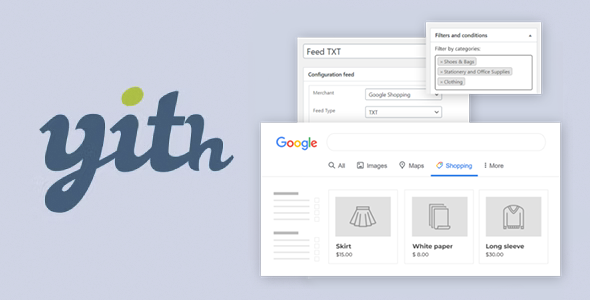
YITH WooCommerce Google Product Feed is designed for those who want to appear in Google Shopping with an up-to-date and well-structured WooCommerce product catalog. It allows you to create and maintain feeds optimized for Google Merchant Center without having to manually export data or deal with confusing spreadsheets. It's especially useful for stores with more than a few products looking to increase visibility and sales from Google search results.
What problem does it help solve?
When you manage an online store on WordPress with WooCommerce and want to list your products on Google Shopping, the first hurdle is transforming all your catalog information into a feed that Google understands and accepts without errors. This involves mapping fields, meeting formatting requirements, keeping prices and stock levels up-to-date, and frequently updating changes. If you've ever had Google reject products without understanding why, you know this frustration all too well.
In real-world projects, this blockage translates into products not appearing in ads, campaigns wasting budget without showcasing your entire catalog, and hours wasted correcting warnings in Google Merchant Center. Many businesses end up improvising with manual CSV exports or poorly optimized WooCommerce extensions, resulting in incomplete feeds, incorrectly assigned attributes, and highly unsustainable management as inventory grows.
Why this solution makes a difference
YITH WooCommerce Google Product Feed focuses on a single purpose: generating product feeds specifically designed for Google from the information you already have in WooCommerce. Instead of forcing you to work with external spreadsheets, it allows you to organize attributes, categories, prices, and variations directly within WordPress, reducing duplication and intermediate steps. This directly impacts the time you spend preparing campaigns and the quality of the data that Google sees.
In day-to-day operations, this means that when you modify a price, change a title, adjust a category, or update stock, the feed can reflect it without you having to redo exports or perform manual reviews. When you start noticing that changes in your catalog aren't aligning with what appears on Google, this lack of coordination ends up affecting ad performance, click-through rate, and the user experience, as users see outdated information in search results.
Signs you need this product
- You're already using Google Shopping And most of your products appear with warnings or rejected in Google Merchant Center without a clear reason when reviewing the feed.
- You manage the catalog from WooCommerce But you resort to CSV exports or external tools to create the feed, repeating work and wasting time every time there are changes.
- You start to lose control about which products are being sent to Google, what attributes it is reading, and what information the end user sees in the ads.
- Your store is growing In terms of the number of products, variations, and categories, maintaining a manual feed has become a delicate task, with a constant risk of errors in data, prices, or availability.
When does it make sense to use it (and when doesn't)
Using YITH WooCommerce Google Product Feed makes sense when your acquisition strategy includes, or will include, Google Shopping and you need WooCommerce to send catalog data in an organized and consistent way. This is especially relevant when working with dozens or hundreds of products, size and color variations, or when managing complex categories and you want Google to receive the correct structure without having to redefine everything from scratch on another platform.
It also adds value when you want to maintain a clear correspondence between WooCommerce fields (title, description, price, custom attributes) and the fields Google requires in feeds, avoiding confusing translations or makeshift configurations. If you've ever experienced different tools generating feeds with varying criteria, leaving you unsure of what Google is using, centralizing this process in WordPress simplifies decision-making and reviews.
However, this product isn't necessary if you run a very small store with few items and don't plan to use Google Shopping or submit your catalog to Google Merchant Center. It's also not a priority if you only use traditional text campaigns or social media without involving your WooCommerce product listings. In those cases, adding a Google-specific feed generator won't directly benefit your current strategy.
Who it fits best for
- WooCommerce store owners who want to expand their reach through Google Shopping and need a structured way to submit their catalog without managing external files.
- Marketing agencies and professionals who manage multiple stores on WordPress and are looking for a consistent way to set up feeds, reduce incidents in Google Merchant Center, and maintain reliable data for campaigns.
- Growing ecommerce projects who have overcome the initial phase with few products and are beginning to notice that the manual or improvised feed does not scale, generates inconsistencies and increases the risk of errors in prices and availability.
Practical benefits
- Actual operational improvement: You bring together catalog management and feed generation in one environment, reducing duplicate tasks and coordination problems between WooCommerce and Google Merchant Center.
- Clearer user experienceYou can work with the same fields, attributes, and categories that you already manage in WordPress, instead of adapting to external structures that don't align with your store.
- Greater control and organizationYou understand exactly what information is being sent to Google, what fields feed the feed, and how they relate to the requirements for products to be accepted.
- Significant time savingsYou stop having to redo manual exports every time you change a price or edit a product, reducing feed maintenance hours and constant reviews.
- Reduction of errors in the catalogBy minimizing external file manipulation, the differences between the actual WooCommerce content and the data received by Google are reduced, preventing rejections and ads with outdated information.
How it fits within WordPress
Within the WordPress ecosystem, YITH WooCommerce Google Product Feed acts as a bridge between your WooCommerce catalog and Google's advertising environment. It doesn't replace product, price, or stock management; it leverages what you already manage in WooCommerce and transforms it into the format Google needs to display your items in its search results and ads. In this context, it becomes another piece within your regular workflow, not a separate platform.
When working with WordPress, this means you don't need to leave the dashboard to prepare your data for Google. You can review products, adjust content, update attributes, and know that the feed will use that information as a reference. This way, your site becomes less dependent on external processes and gains consistency: what you decide in WooCommerce is what the user ultimately sees in Google Shopping, with much clearer traceability.
Typical use cases
- Fashion store with multiple variationsAn ecommerce site with different sizes and colors for each product needs each combination to be well-defined in Google Shopping, so that the ads show the correct variant without confusion.
- Specialized store with extensive catalogA store selling technical products (electronics, spare parts, equipment) that handles many attributes and needs to keep them aligned with the fields that Google requires in the feed.
- Project that intensifies investment in Google AdsA business that was already advertising in a basic way and decides to seriously invest in Google Shopping, requiring a solid, stable feed directly connected to WooCommerce to avoid hindering campaign performance.
Frequently Asked Questions about YITH WooCommerce Google Product Feed
What kind of WooCommerce data can be sent to Google with YITH WooCommerce Google Product Feed?
YITH WooCommerce Google Product Feed leverages the data you already have defined in your WooCommerce products: titles, descriptions, prices, images, categories, and attributes. From there, it allows you to structure that information into a feed that adheres to Google Merchant Center specifications. This helps you align fields like identifiers, product categories, and availability data with what Google expects to see in order to display relevant ads.
What happens to product variations when generating the feed for Google Shopping?
In stores that work with variations (for example, different sizes or colors), the challenge is ensuring that Google receives each combination clearly and distinctly. YITH WooCommerce Google Product Feed takes the variations created in WooCommerce and incorporates them into the feed according to the structure you configure, so Google can display the appropriate options in the ads. This reduces confusion and prevents variations from being left out of the submitted catalog.
How does YITH WooCommerce Google Product Feed help reduce rejections in Google Merchant Center?
Many rejections occur due to incomplete data, incorrectly mapped fields, or formats that don't comply with Google's rules. YITH WooCommerce Google Product Feed is designed to organize WooCommerce information in a way that meets Google's product feed requirements. By working with a structure optimized for Google, it's easier to meet requirements for mandatory fields, categories, and appropriate descriptions, thus reducing issues and products being rejected.
Is YITH WooCommerce Google Product Feed useful if I work with a lot of price and stock changes?
In stores with high turnover, where prices change frequently or stock moves quickly, relying on manual feeds often leads to discrepancies between WooCommerce and the ads. YITH WooCommerce Google Product Feed pulls information directly from your catalog, making it easier to keep what Google sees up to date. This ensures that the adjustments you make in WordPress are more accurately reflected in the feed, reducing ads with outdated data that can negatively impact the user experience.
How does YITH WooCommerce Google Product Feed differ from using generic CSV exports?
Generic CSV exports aren't specifically designed to meet Google Shopping's requirements and often require significant subsequent manual work in spreadsheets. YITH WooCommerce Google Product Feed, on the other hand, focuses on translating WooCommerce fields into the format Google needs, directly from within WordPress. This reduces intermediate steps, eliminates the need to manually restructure columns, and improves consistency between your product catalog and feed-based campaigns.
Conclusion
YITH WooCommerce Google Product Feed exists to solve a very specific problem: connecting your WooCommerce catalog to Google Shopping in an organized way, without relying on spreadsheets or difficult-to-maintain manual processes. When you start noticing that preparing or updating the feed is taking more time than is reasonable or generating repeated errors in Google Merchant Center, having a tool focused on this link between WordPress and Google becomes key to sustaining your product campaigns.